GitLab Dedicated Switchboard Troubleshooting
Overview
Switchboard is a portal customers use to manage their GitLab Dedicated instance. Select GitLab team members have access to Switchboard. Read more about what the goals of Switchboard are on the Category Direction page.
Accessing Switchboard
GitLab Support Engineers can access the Switchboard application by searching for Switchboard (production) in the Okta homepage.
You can also access directly:
- Navigate to https://console.gitlab-dedicated.com
- Enter your GitLab email and click Continue
- You should be signed in to Switchboard through Okta
A complete list of Switchboard URLs can be found in the Switchboard project docs.
During onboarding, GitLab Dedicated customers get access to Switchboard. Temporary credentials are sent to these customers through email. If these credentials expire, customers may open a Support ticket. Support Engineers should open a request for help with Switchboard.
Customers with Dedicated Preprod deployments
GitLab Support Engineers can access Switchboard for Preprod deployments. Look for the Switchboard Preprod Dedicated tile in Okta.
Password reset
External Switchboard users can reset their password independently using the Switchboard application.
Multi-factor authentication (MFA) reset
Switchboard users cannot reset their MFA themselves.
To reset MFA, create a request for help issue for the Switchboard team.
Accessing customer configuration
When launching Switchboard, you should default to the /tenants page with a list of tenant customers.
Name, Identifier, Internal reference, and External URL are listed in a table.
Click on Manage to view settings for that customer.
Understanding Tenant Status Indicators
The Switchboard Overview page displays real-time status information for each GitLab Dedicated instance. When troubleshooting customer-reported incidents, support engineers should refer to the GitLab documentation to understand these status indicators.
Watch this demo on YouTube to see how tenant status indicators appear to customers and internal users (Support and Dedicated SREs).
Support Actions on Customer-reported Incidents
When responding to customer-reported incidents:
- Log in to Switchboard
- Select the affected tenant
- Check the tenant status and take the appropriate action:
Normal status:
- No known internal incidents
- Raise a Dedicated incident to engage the Dedicated SRE on-call
Degraded Performance or Service Disruption:
-
Review Active incidents to determine if the customer-reported impact matches an internal incident
- If a relevant incident exists: Inform the customer that SREs are actively investigating and they will receive ongoing incident updates through Switchboard
- If no relevant incident exists: Raise a Dedicated incident to engage the Dedicated SRE on-call
Important Notes for Support
- Status indicators are informational only and not factored into SLA calculations
- Status updates may take 1-2 minutes to appear after incident state changes
- Severity 3 or 4 incidents aren’t displayed (minimal customer impact)
- Incidents in non-impacting lifecycle stages won’t appear
- If incident occurs during maintenance, both incident and maintenance statuses will be displayed
Checking for Past Notifications in Switchboard
Switchboard allows for the Communications Lead to create outbound communications (see Sending Notifications Using Switchboard). When troubleshooting Dedicated support tickets, checking if any Notifications have been sent can be a helpful first step.
All customer notifications are logged in Switchboard. To view past notifications:
- Click on your profile in the top left corner
- Select
Customer notifications - Click on the Title of the relevant notification to view the message and its recipients
Watch this overview on YouTube of how these notifications are created and how they can be viewed in Switchboard.
-
Visibility of what the email looks like from a customer’s perspective
The following is an example of a notification about an incident. It is from the test environment but formatting will be the same.
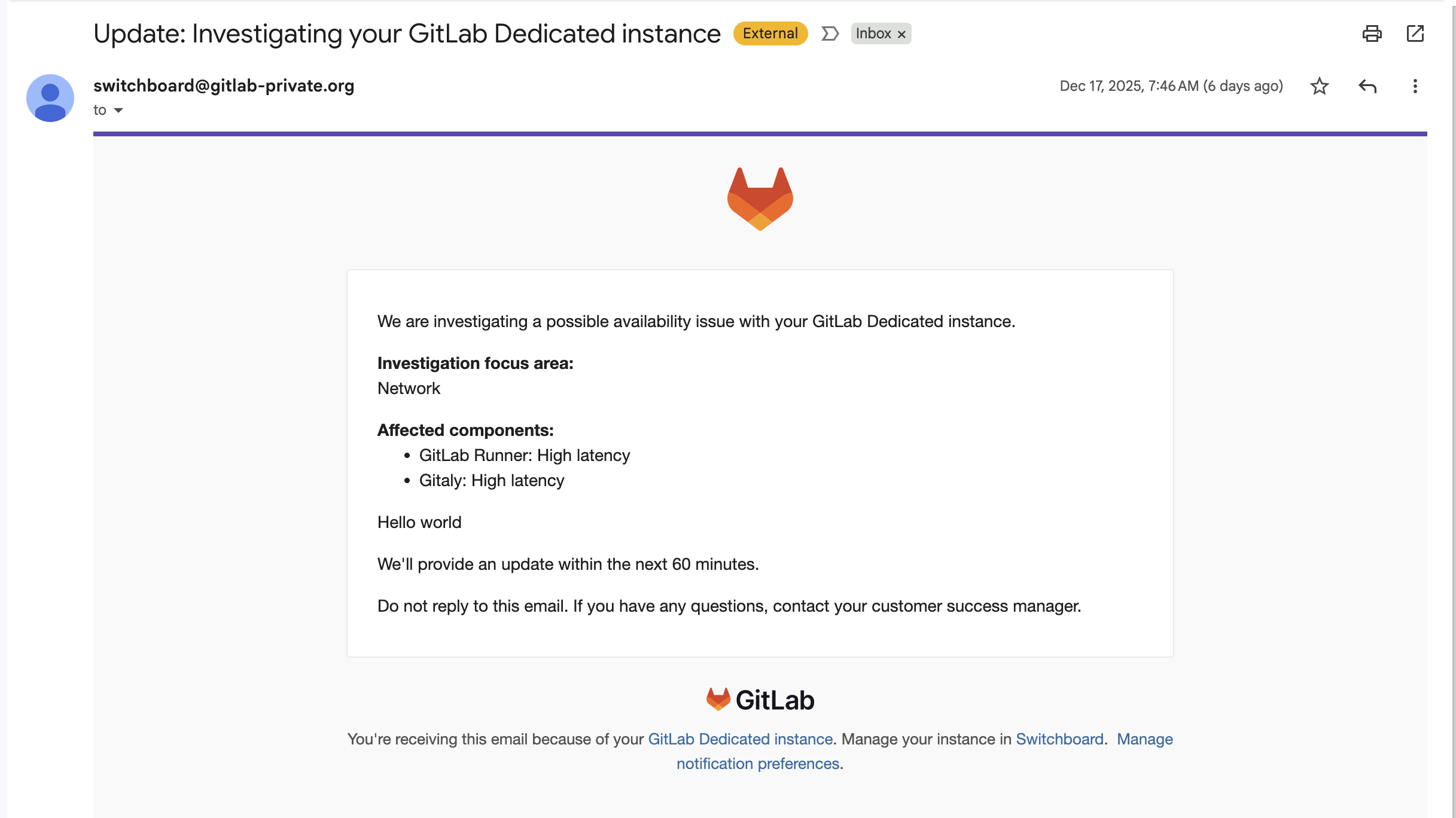
-
Sender’s email address
The sender’s email address will depend on the Switchboard environment. Here are the two email addresses used for customer tenants:
- Production:
switchboard@gitlab-dedicated.com - Preprod:
switchboard@gitlab-dedicated.systems
- Production:
-
Email subject(s) used
- Investigating alerts on your GitLab Dedicated instance
- Update: Investigating your GitLab Dedicated instance
- Update: High-priority response for your GitLab Dedicated instance
- Update: Working to resolve your GitLab Dedicated instance issue
- Resolved: Your GitLab Dedicated instance is operational
- Emergency maintenance scheduled for your GitLab Dedicated instance
- Emergency maintenance completed
These can also be found in the templates and new ones may be added over time.
-
Possible backend checks to confirm if an email has been delivered to the customer’s mail servers
This will not be available. Switchboard can confirm that an email was sent and you can access historical notifications using Switchboard but we cannot confirm whether an email was successfully delivered to the customer’s mail server. We can only confirm that it was sent.
Version information
Check the Tenant Details collapsible section.
Maintenance schedule
Check the Maintenance collapsible section.
Opensearch links
These are available to Support team members on the Tenant Overview page.
Customer contacts
Check the Customer Communication section on the Tenant Overview page.
Customer CSM (formerly TAM) is also included in this section.
AWS regions
Check the Tenant Overview page.
View history
- Click the Audit Logs link at the top of the page.
- Filter for
Tenant. - Check the Tenant#<tenant_id> records to view changes.
b015dc92)
