CSM Onboarding
View the CSM Handbook homepage for additional CSM-related handbook pages.
Onboarding for Customer Success Managers is a guided, methodical process to ensure new team members have the knowledge they need to be effective.
There is a lot to learn to make you a great GitLab Customer Success Manager. It is important for new team members to gain competency on how our platform solutions provide customer value, and how we partner with customers to build a productive relationship. This handbook page will provide an overview of what can be expected during the onboarding journey including learning objectives, milestones, and ways in which a manager and onboarding buddy can support a new team member during their onboarding.
Overview of Role Based Customer Success Manager (CSM) Onboarding
As a CSM, your onboarding experience will be a blended learning experience that includes virtual synchronous meetings, a self-paced role-based learning path on LevelUp (our internal Learning Management System), and a hands-on virtual workshop called Sales Quick Start (SQS).
The role-based learning path is highlighted in this role-specific onboarding guide. It is recommended that you make a copy of this document and check off items as you complete them.
Learning Objectives for CSM Onboarding
As a CSM, in addition to the SQS learning objectives, your onboarding is intended to fulfill the following learning objectives:
Module 1: CSM Basics and Call Shadowing
- Complete Pulse+ Customer Success Manager Certificate I
- Complete Pulse+ Advanced Customer Success Manager Certificate II
- Understand the different stages of call shadowing
Module 1.5: Demo Environment
- Demonstrate understanding of GitLab Basics
- Understand the stages of the DevSecOps Lifecycle
- Understand the different pricing tiers of GitLab
- Complete Demo Systems Initial Set Up
Module 2: CSM at GitLab
- Understand the role of a CSM at GitLab
- Understand the mission and vision of the Customer Success organization
- Understand the CSM’s responsibilities within the customer journey
- Understand the distinction between CSMs and Customer Success Engineers (CSEs)
- Understand the rhythm of business for a CSM
- Demonstrate customer readiness by completing role play exercise
Module 3: Technical Deep Dive
- Complete the following certification: GitLab Certified Git Associate
- Understand the CSM’s responsibilities as it relates to customer cadence calls
Module 4: CSM Deep Dive
- Understand Value Based Conversations
- Understand your role and responsibilities as a CSM as it relates to Success Plans
- Understand how to navigate and what resources to find on Highspot
- Understand the direction, value, and methodology of Professional Services at GitLab
Module 5: Tools and Best Practices
- Complete the following certification: GitLab Certified CI/CD Associate
- Understand the workflow and documentation practices for Gainsight and Salesforce
- Understand reference architectures and their associated costs
Module 6: EBR and Customer Conversations
- Understand the CSM’s role and responsibilities as it relates to Executive Business Reviews (EBRs) with your customer
- Complete the following certification: GitLab Certified Security Specialist
- Understand value based discovery for DevSecOps
Module 7: CSM Onboarding Conclusion
- Complete the following certification: GitLab Certified Project Management
Milestones and Onboarding Roadmap
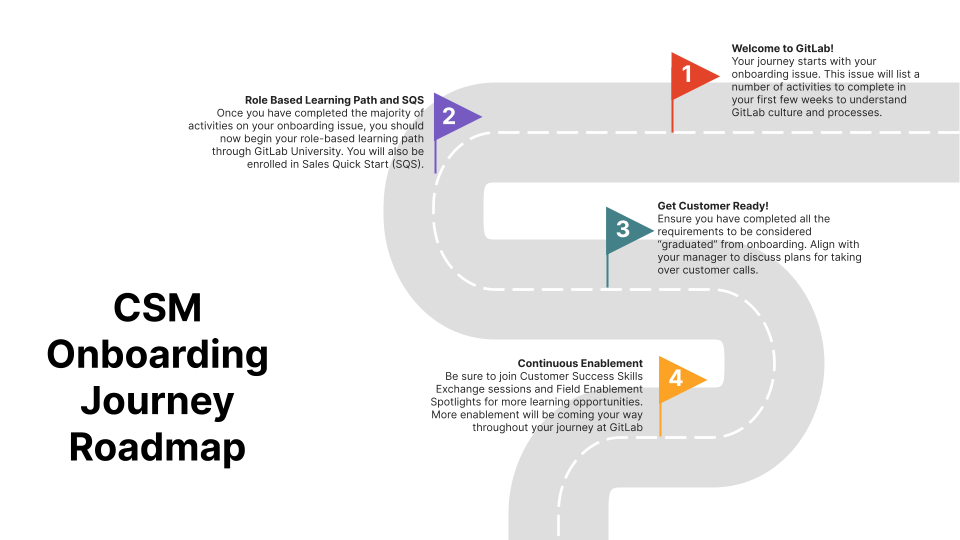
Expectations for Manager support during onboarding
As a new CSM, your manager will be there to support you during your onboarding journey. Beyond the expectations laid out for your manager in your onboarding issue, you can anticipate they will also provide you support on the following:
Month 1
- Schedule recurring 1:1s and check in calls
- Provide guidance on who the new team member should schedule coffee chats with during their onboarding journey
- Review and discuss company policies
- PTO policy
- Family and Friends first culture
- CREDIT Values
- Discuss any team specific expectations
- Review organizational structure
- Ensure new team member has access to role-specific tools and appropriate Slack channels
- Align on a general plan to get customer ready including who to schedule your onboarding role plays with and shadow at least 4 calls per week
- Ensure new team member is meeting expected milestones from week to week
- Identify skills to be mastered and resources available to accomplish learning objectives
Month 2
- Check in regularly with your new team member
- Ask them if they are experiencing any challenges with GitLab’s asynchronous culture
- Discuss any general concerns
- Share constructive feedback on role plays that were completed during the onboarding learning path
- Ensure onboarding milestones are met and that new team member is completing required courses and certifications
- Align on whether your new team member is on track to be customer ready and how else you can provide support to get them ramped
- Discuss best practices and rules of engagement for CSMs
Month 3
- Decide on a regular cadence for 1:1 calls
- Prep your new team member for taking over assigned customers/accounts
- Consider shadowing your new team member’s customer calls and provide feedback as needed
- Confirm that new team member has completed all mandatory and necessary onboarding activities including SQS and role-based learning path
- Discuss how their performance will be formally evaluated
Beyond 3 months
- Provide regular feedback on performance
- Partner with employee to develop an individual growth plan for goals they want to achieve in the coming year
- Discuss the following topics at length in the coming months by providing an overview of the topic, why is it important to customer / GitLab / CSM, what does good look like, what are some common pitfalls, and how success is measured:
- Cadence Calls
- Success Plans
- EBRs
- Customer Escalations
- Customer Enablement
- Gainsight Hygiene
Expectations for Buddy support during onboarding
Month 1
- Nurture a welcoming environment for the new team member
- Establish a recurring 1:1 meeting to check in on the new team member’s progress on onboarding activities
- Provide assistance with any barriers or difficulty understanding concepts covered in the onboarding learning path and SQS
- Connect the new team member with members of the broad team to build a network
- Share helpful tips and resources that are beneficial during their onboarding and beyond
Month 2
- Provide opportunities for new team member to shadow you on calls as defined in the shadow criteria and assist with note taking
- Debrief on calls and discuss feedback
- Align with new team member’s manager on ways you can provide support
Month 3
- Co-lead calls with the new team member until they are ready to take over customer interactions independently
- Share constructive feedback
- Inform new team member on how you can support them beyond their onboarding journey
The buddy should join the first 5-10 customer meetings led by the new joiner.
- It is not only for technical guidance but much more for general feedback and building confidence in the CSM role.
- The close feedback loop will enable new CSMs to learn faster by helping them understand if their approach was the best one, where they can improve, and what went well.
- Generally, increased interaction between the onboarding buddy and new CSM will reduce the onboarding time.
- Asking questions and feeling comfortable doing so, improved new hire satisfaction to start working with clients
Graduation from CSM Onboarding
In order to be considered as having graduated from your CSM onboarding journey, you need to have completed the following:
- Completed Sales Quick Start (SQS) prework on GitLab University
- Attended the SQS workshop and completed all relevant activities
- Completed your role-based learning path on GitLab University
- Completed the Pulse+ CSM Certificate I and Advanced CSM Certificate II
- Attained the following certificates:
- GitLab Certified Git Associate
- GitLab Certified CI/CD Associate
- GitLab Certified Project Management Associate
- GitLab Certified Security Specialist
- Completed role play activities and discussed feedback with your manager / onboarding buddy
- Shadowed at least 4 calls per week throughout your onboarding and discussed with your manager
Continuous Enablement
For high level information on enablement initiatives for the Customer Success Manager/Engineer teams, please refer to the CS Enablement Corner. Additionally, please be sure to check out the CS Development Handbook page.
You will be receiving calendar invitations for Customer Success Skills Exchange and Field Enablement Spotlight sessions. Customer Success Skills Exchange is a biweekly series while Field Enablement Spotlight is a weekly session. Both cover various topics related to and pertinent to the field. Please be sure to join and participate in these sessions!
Feedback
Your feedback on the onboarding process is important to us and we welcome your thoughts and ideas about how we can improve in the future. Please share your feedback in the following issue: CSM Onboarding Feedback.
Support and our Single Source of Truth
Since GitLab is a handbook first organization, the answer to any question you may have particularly throughout your first thirty days should be documented and readily available as this is our Single Source of Truth (SSoT).
If you are unable to find the information you are looking for, please be sure to reach out to your Manager; Onboarding Buddy; People Connect Team member or Enablement Program Manager for support by tagging them in the comments section of this issue. If you need to troubleshoot specific issues with tools, you can add a screenshot of the issue directly in the comment to help them diagnose the problem.
Alternatively once you are active on Slack, which is used solely for informal communication, you will notice that you have been automatically added to a handful of useful support channels such #questions, #cs-questions, #solutions-architects, #it-help, etc.
Meeting shadowing
To learn how we conduct both customer meetings and internal planning meetings, a new team member will shadow these meetings with one or more established members of the team.
Meeting Shadowing
CSM Office Hours
We host weekly CSM office hours meetings to help you answer questions in a judgment-free space. You can add your questions to the agenda document linked in the Google Calendar invite and hop on the call to work through questions or learn how to find helpful resources.
Helpful resources for faster onboarding
By talking to new hires and recent new CSM team members, it was identified that the onboarding buddy relationship plays a critical role for success of a new hire in the CSM team. Existing CSMs explained that having a very close / short loop to their onboarding saw a close relationship as a tremendous speed up of their onboarding.
Buddies should always be CSMs (same department), to match the role as close as possible, as it will help the new hire to resolve questions around their responsibilities and tasks quicker and more efficient, compared to going through multiple chats or calls. To pick an onboarding buddy, CSM managers will use the guidance section for buddies from our general handbook section.
SLACK Channels
New team members often struggle to find the right set of slack channels to participate in, and to filter out noise that is not relevant to them, especially in the first weeks of their start in the CSM team. The following list should provide an initial set of channels that will be helpful to new hires.
For all product management related questions, a CSM should review our handbook page at following location to identify the right channel for the topic they are looking to learn more. Those team channels should be asked if there is no documentation available for the problem/question and also if the CSM did not find an issue that already discusses this question.
A great resource to learn how to engage with GitLab product is available in the product handbook here
Handbook Pages and Resources
Collection of key handbook pages and other resources for CSMs to read and focus on when onboarding in their first 3 months
Product Knowledge
Collection of initial set of key product links, which will help in the first 4-6 weeks of onboarding as a new hire.
- Offerings: GitLab Dedicated vs. GitLab SaaS vs. GitLab Self Managed
- Self Managed: In GitLab Self-managed you will have full control over the server itself and the environment
- Dedicated:: A single-tenant SaaS service for highly regulated and large enterprises
- SaaS: The GitLab software-as-a-service offering. You don’t need to install anything to use GitLab SaaS, you only need to sign up and start using GitLab straight away
- GitLab Self Managed
- Key functionality of GitLab
- GitLab Product
GitLab Webinars
As a new joiner to get up to speed on your technical skills and observe how more senior team members hold webinars find the Webinars on the CSM Scale Webinar calendar and register/join as participant.
You can also watch the recordings of some of those Webinars on YouTube - GitLab Webinars - GitLab Unfiltered - Playlist.
For self lead training and experimentation you can setup your own playground/demo space on GitLab.com. Find a self-paced guide here:
GitLab Self Managed Playgound and Demospace
Many of our prospects and customer choose the option to maintain their own Self Managed GitLab installation based on the reference architecture. To be able to walk in your customers shoes and experience the same possibilities as well as challenges, there is a shared GitLab Omnibus enviroment for CSMs to use.
- Follow these instructions to get access to the shared Omnibus Instances
- The Get started administering GitLab Guide is a great starting point
- You can export a Service Ping data file from the instance and explore product usage data via the Service ping analysis engine
Finding Answers
GitLab is a massive and everchanging Product, nobody can know everything. So it is important to learn how to find answers. These handbook pages might help you with it.
- Searching GitLab like a pro
- Researching Customer Questions
View the CSM Handbook homepage for additional CSM-related handbook pages.
To learn how GitLab CSMs approach customer engagement and planning conversations, a new team member shadows an established, more senior member of the team in a variety of meetings and actions taken related to those meetings.
Senior members of the team should proactively invite new CSMs for shadowing and include them on any prep or follow up that takes place for the call.
