Ticket Lifecycle
The Support Ticket Lifecycle is our shared language for talking about the work we do on support tickets from the moment a customer reaches out until we’ve closed the loop.
It is not a new process to memorize or a checklist to follow perfectly. It is a map of the work we already do, so that:
- We can talk about tickets in the same way (in 1:1s, feedback, SWIR, issues).
- We can see where we’re strong and where we’re struggling.
- We can improve specific parts of the journey without making everything heavier.
- We can connect our day-to-day work to knowledge creation (KCS) and continuous improvement.
This page is the evergreen reference we link to in onboarding, enablement, collaboration conversations, and 1-1s when we say “think about the lifecycle of a ticket”.
The lifecycle at a glance
Every support ticket can be understood through six phases:
- Logging – Capturing the request and its context.
- Triage/Routing – Getting the ticket to the right place with the right priority.
- Authorization (conditional) – Getting the approvals or verifications we need before we act.
- Diagnosis – Understanding what’s actually happening and why.
- Resolution – Delivering a solution or best-available workaround and confirming it works.
- Closure – Wrapping up the ticket with clear communication and high-quality data.
Tickets don’t always move through these in a perfect straight line, and some phases may be very small or skipped for simple cases. That’s OK. The goal is shared language, not a rigid pipeline.
Knowledge practices (Knowledge-Centered Service) sit underneath and around all of these phases. Every phase both uses our shared knowledge and adds back to it.
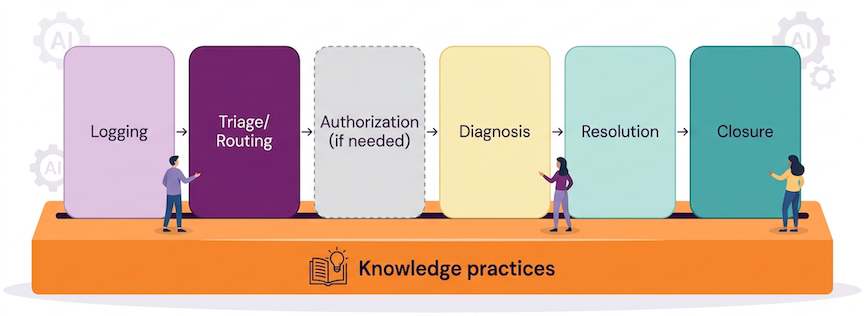 Target state: shared lifecycle language, excellence in every phase of ticket work, with knowledge practices enabling and evolving all phases.
Why we use this lifecycle
Our default instinct is to do excellent work in Diagnosis and Resolution, as customers come to us for technical help.
But customers benefit from the whole journey, not just the moments when we’re actively debugging:
- They feel how easy it is to log a ticket, be understood, and know what will happen next.
- They feel how quickly their request reaches someone who can actually help.
- They feel how safe and thoughtful we are when we handle sensitive data or high-risk actions.
- They feel how clearly we close the loop and whether the outcome makes sense.
Customers also benefit from what they don’t see directly:
- When we log and triage well, we can give Product and Engineering clear, timely signal about what’s hurting customers.
- When we close consistently, we create data that makes it easier to spot trends and drive roadmap, UX, and docs improvements.
- When we treat knowledge as part of every phase, future customers get better self-service and smoother digital experiences before they ever need to open a ticket.
The lifecycle helps us:
- Make early and late phases (Logging, Triage, Closure) as intentional as the middle.
- Talk about tickets in a way that’s more precise than “good/bad”.
- Decide where to invest when we change workflows, tools, or training.
- Turn today’s tickets into tomorrow’s better product, better docs, and better experiences through KCS and continuous improvement, instead of relying on one-off heroics.
Phases in more detail
Each phase description below includes:
- A short definition.
- What happens there.
- What excellence looks like in practice.
Logging
Goal: Capture a clear initial record of the customer’s request and key metadata so the ticket can be routed correctly and meaningful work can start.
What happens here
- Customers (or GitLab team members on their behalf) submit tickets.
- We collect core context by using forms, fields, and the ticket description.
- We may ask a first round of clarifying questions.
Excellence looks like
- Our support portal and forms make it clear how to log a request, so customers can easily pick an appropriate path (for example L&R vs SaaS vs Self-Managed vs Dedicated).
- Key metadata needed for routing (such as environment, subscription type, and basic impact) is captured through fields at ticket creation, not hidden in free text.
- When GitLab team members log tickets on behalf of customers, they follow the same standards: a clear, specific subject and enough structured context to start routing.
- We periodically review a sample of newly logged tickets and tune forms, helper text, and options so that “good enough to route and start work” is the default outcome.
Triage/Routing
Goal: Make sure each ticket is in the right place in our queues — with appropriate weight, form, severity, and region — so that the right Support Engineer can pick it up at the right time with enough context to start.
What happens here
- We confirm or adjust severity and priority based on real customer impact.
- We ensure the correct form is applied.
- We automatically set ticket weight so it is ordered appropriately in the queue.
- We rely on the customer’s preferred region for support (AMER, APAC, EMEA) and use that in queue management and ownership.
- For some L&R requests, tickets first go to our BPO; they may escalate into Support Engineering queues when needed.
Excellence looks like
- Severity and priority reflect the actual impact and urgency, not just the default choice from the portal.
- The ticket is on the right form, so downstream fields and workflows behave as expected.
- Ticket weight is set so that high-impact work for the right customers and severities naturally floats closer to the top of the queue.
- Preferred region for support is respected wherever possible, and when we deviate (for example, emergencies, hand-offs across regions) we leave a short internal note explaining why.
- L&R tickets follow the expected path:
- BPO handles what they can.
- Escalations into Support Engineering are clear, with enough context for us to move quickly.
- When we see recurring triage problems (for example, wrong form, mis-set severity, confusing portal options), we feed those back into improvements to forms, helper text, or workflows instead of silently correcting them forever.
Authorization (conditional)
Goal: Safely and accurately obtain required approvals or verifications before making changes that affect security, data, or contractual obligations.
What happens here
- We verify identity and ownership for sensitive actions (for example, 2FA resets, account or data changes).
- We obtain approvals from Security, Legal, or other stakeholders where needed.
- We pause visible work while we wait for required confirmations.
Excellence looks like
- Identity checks and approvals follow a documented workflow, not ad hoc judgement.
- Internal notes clearly state what was approved and under which policy.
- It’s obvious from the ticket history why we took extra care here.
- Painful or confusing parts of these workflows are fed back into improvements.
Diagnosis
Goal: Understand what is actually happening and why, with enough depth to make safe, effective recommendations.
What happens here
- We clarify the customer’s goal and constraints.
- We gather logs, configs, and reproduction steps.
- We reproduce when reasonable and consult runbooks, KB, and product docs.
- We collaborate with Pods, SMEs, and other teams as needed.
Excellence looks like
- Notes tell a coherent story of what was tried, what was learned, and what changed our mind.
- We use and update existing runbooks/KB/docs rather than starting from scratch every time.
- When we’re stuck, we ask for help with clear context, not “any ideas?”.
- Another engineer could resume the ticket mid-stream and know what to do next.
Resolution
Goal: Provide a solution or best-available workaround that the customer can apply, and confirm that it meets their needs.
What happens here
- We offer concrete steps, config changes, or workflows.
- We file or link product issues for bugs and limitations.
- We explain trade-offs and what is or isn’t possible.
Excellence looks like
- Guidance is testable, clearly labeled as fix vs workaround vs further investigation.
- We validate with the customer that the outcome is acceptable (or agree on next steps).
- Product issues are clear, linked, and describe real customer impact.
- We name remaining limitations honestly rather than burying them.
Closure
Goal: Close the ticket in a way that leaves clear communication for the customer and high-quality data and context for future us.
What happens here
- We send the final public message.
- We populate closure fields (for example, product category, resolution codes, resolution notes) according to current guidance.
- We create follow-up tickets or tasks if more work is needed.
- We invite the customer to give us feedback.
Excellence looks like
- Closure fields accurately describe why the ticket existed and how it ended, rather than whatever is quickest to click.
- Resolution notes (internal) are 1–3 sentences that will still make sense months later.
- The final public message clearly states the outcome and any next steps where possible.
- When future work is required elsewhere (for example, product, CSM, another Support ticket), it exists and is linked.
Knowledge is everywhere (KCS and the lifecycle)
KCS isn’t only something we do at the end of a ticket or in special “doc time”. It is woven through every phase:
- Logging: Good problem statements and relevant links make future tickets and search results better.
- Triage/Routing: Accurate categories and tags create better slices of data for analysis and docs.
- Authorization: Clear internal notes about what was approved and why become reference points for future sensitive actions.
- Diagnosis: Clear internal notes double as source material for docs, runbooks, articles, and training.
- Resolution: Strong explanations often become the first draft of a KB article.
- Closure: Good closure fields and summaries make it possible to find patterns worth documenting.
When we talk about “doing KCS well”, we are also talking about doing the lifecycle well. Every ticket is both a customer journey and a data point; knowledge practices are how we honor both.
How to use this page
Support Engineers
- When you work a ticket, occasionally pause and ask:
- “Which phase am I in right now?”
- “What would excellence in this phase look like for this ticket?”
- When something feels painful or confusing, try using this language:
- “This is a triage problem.”
- “The closure guidance for this ticket type is unclear.”
- “This would be a good KCS opportunity.”
Support Managers and Leads
- Use the phases in feedback and coaching:
- “You’re very strong in Diagnosis; let’s work on your Closure habits for complex SaaS tickets.”
- In ticket reviews, label comments with the phase:
[Logging],[Triage],[Diagnosis], etc.
- In 1:1s and talent assessments, talk about how people show up across the lifecycle, not just how many tickets they close.
Support Readiness / Ops / Training
- When updating workflows, forms, or training, ask:
- “Which phase is this really about?”
- “What does ‘great’ look like there, and is that clear in our docs?”
- Consider adding a light “Lifecycle phases:” indicator on key workflow pages (for example,
Lifecycle phases: Closure, KCS-heavy) to help people navigate by phase.
How this connects to other pages and projects
This lifecycle is a lens, not a replacement, for:
- Existing Support workflows (triaging tickets, working on tickets, emergency workflows, Knowledge Base workflows, etc.).
- Our ongoing work on closure habits, product categories, and resolution codes.
- Onboarding and training content for new Support Engineers.
- Issues and epics in the Support Team Meta and Support Training projects where we improve workflows and tooling.
When you open or work on an issue about Support workflows, you can use this page as a shared reference:
- Name which phases you’re targeting.
- Describe what “better” would look like in those phases.
- Link back here so everyone shares the same map.
What’s next
We will continue to:
- Use this lifecycle language in issues, reviews, and SWIR.
- Add concrete case studies that show tickets “before and after” we apply this lens.
- Update workflows, training, and metrics iteratively so that excellence in all phases becomes normal, not exceptional.
If you have suggestions or examples that would improve this page, please open an issue or merge request in the Support Team Meta project referencing this workflow.
References
- Origins of this page and the history behind it (support-team-meta issue #7590)
b1f69741)
